Starting a job search means getting your career-marketing ducks in a row. One of those is, of course, your resume. But what about your LinkedIn profile?
Whether a recruiter or hiring manager hears about you first from a referral, an application, or finds you on LinkedIn, they’ll end up at your profile at some point in the process. And of course, LinkedIn isn’t only a job-search platform. Colleagues will check you out, as will the people you meet while networking. They all arrive to learn more about you—professionally, certainly, and sometimes personally.
The real question is: What is your LinkedIn profile saying about your professional brand?
If your profile is incomplete, outdated, or simply a copy of your job title and employment history, you could be missing opportunities. That’s not to say it needs to be amazing, but it does need to be complete with a strong foundation. Think of this as your marketing website to tell other professionals about yourself.
A well-developed LinkedIn profile should make it easy for someone to understand who you are, what you do, what you’re good at, and where you can add value.
Start with the Big Picture
Whether you’re new to LinkedIn or you’ve been on the site for years, as you enter a job search, it’s helpful to step back and assess. What are you telling people who land here? What do you want to tell them?
It’s important to note that your resume and profile needn’t be identical. However, they should make sense together and have enough in common that readers of both are seeing the same story. Start by asking yourself: If someone spent 30 seconds looking at my profile, would they understand what I do and the value I bring?
If the answer is no, that’s where you should start.
Your Photo and Cover Image Make the First Impression
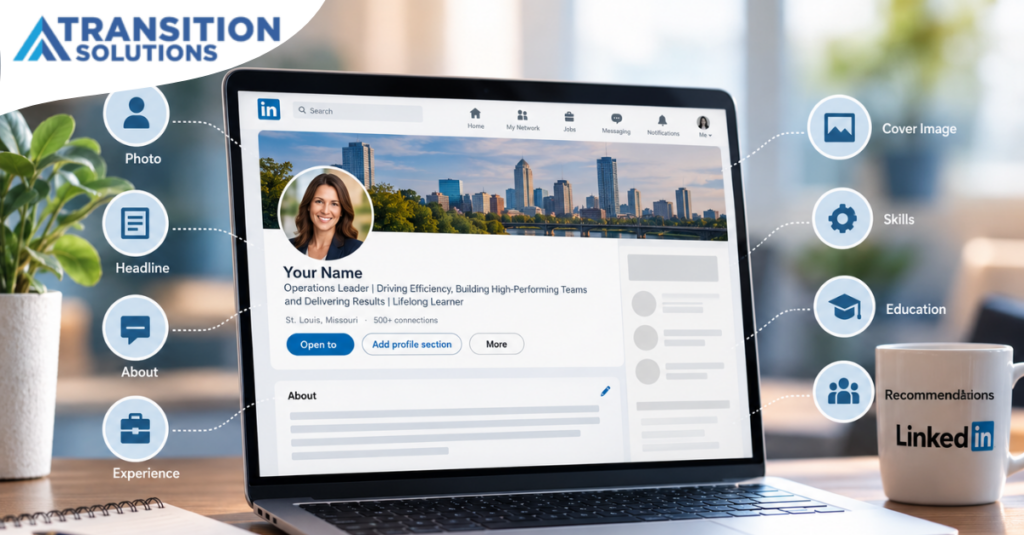
Your profile picture is one of the first things people notice, so use a current, professional headshot. You don’t necessarily need a formal corporate portrait, but you should look approachable and appropriate for your industry and the professional image you want to project. Definitely smile.
Your cover image serves to introduce your professional identity, so don’t overlook this image. Just as the images on a website tell you what that company does, your cover image tells employers who you are and how you add value. It could be an image only that conveys what you do, or you can add words to be even more literal. Either way, this picture should speak to your brand.
AI and Canva offer wonderful ways to develop something eye-catching.
Your Headline Should Say More than Your Job Title
One of the easiest LinkedIn profile mistakes is allowing LinkedIn to simply populate your headline with your current job title and company. Those 220 characters provide you an opportunity to say so much more.
Instead of: Marketing Director at ABC Company, you might say something along the lines of:
Marketing Director | Brand strategist who builds visibility and customer engagement through integrated campaign management | Coffee before water
The right approach will depend on your experience and career goals, but the principle is the same: Use your headline to communicate your professional identity and the areas in which you create value. Plus, you can always say a bit about who you are as a person.
Your headline is also an important place to incorporate relevant keywords.
Think about the terms a recruiter or hiring manager would use if they were looking for someone with your background. Your current or target job title, areas of expertise, industry terminology, and specialized skills can all help describe what you do.
Your headline isn’t just a label; it’s part of your professional positioning.
Your About Section Is Where You Get to Be Human
Your about section gives you more room to tell your story. This is where you can move beyond titles and responsibilities and explain what you bring to your work, how you add value, what motivates you, and what differentiates you.
Think of it as a conversational introduction to share some of your “Tell me about yourself” response in a human voice. The about section content somewhat mirrors your headline components:
- Title and experience
- Value add
- Personal touch
You might start with a compelling statement about your professional focus. Then explain your experience and areas of expertise. Include the types of problems you solve or the value you create. And let some of “you” show.
Recruiters read your about section as a cover letter to learn some of your story. Hiring managers read it to learn what makes you tick. Potential connections read it for both those reasons—as well as to make a person-to-person connection.
Write this as if you’re talking to a professional colleague, not as if it’s your bio that’s going up on the company website. First person, conversational, and engaging.
You can also end with a call to action. If you’re open to networking, consulting, speaking, or discussing career opportunities, tell people how they can connect with you.
Be sure to include your top five skills, in order, that you want to be linked with your professional identity. While these are part of the about section, they are not in the narrative; you’ll choose them just below. As with any skills on your profile, pull your top five from the dropdown menu. Skills connect across the entire LinkedIn platform, so leverage what’s available rather than adding your own.
Experience Should Show More than Where You’ve Worked
Your experience section doesn’t need to be a copy-and-paste from your resume, but it also shouldn’t be an empty list of job titles.
For each position, provide enough context to help someone understand what your job scope was, then highlight accomplishments that demonstrate your value. Recruiters and employers want to know you have the basic skills to do the job. They also want to know how you solved problems.
Just as with your resume, lead with a brief paragraph of what you did, the people you managed, the budgets you oversaw, and the strategic leadership you provided. Follow that with bulleted accomplishments that share the challenges you faced and overcame, along with the results you created.
Aim to craft an “ageless” LinkedIn profile, just as you would with your resume. That means only going into detail for 10–15 years in your experience section. If you want to include older experience, create an “additional experience” component within your about section. This mirrors the additional experience section from your resume.
Before you complete your experience section, add 5–7 skills that were key to each position using the skills part of each position. These should be evidenced through your job scopes and accomplishments.
Skills Are More than a List at the Bottom
Skills are another important part of your LinkedIn profile because they help communicate what you actually know how to do. While they are integrated across your profile, they’re “bucketed” in the skills section. You can have up to 100 skills here, but you don’t want to add skills just to meet a random number.
Start with the skills that are genuinely relevant to your career direction. Look at the language used in job descriptions for the positions you’re pursuing, and make sure your profile reflects relevant skills when they are supported by your actual experience.
Your goal here is to use skills to continue to share your professional story. If you want to be known for strategic planning, change management, stakeholder engagement, project leadership, or a particular technology—and you have meaningful experience in those areas—make sure those skills are represented throughout your profile.
Ideally, your skills should appear naturally in your headline, about section, and experience section rather than existing only as a list at the bottom.
Don’t Forget Education, Certifications, and Other Credentials
Your education section provides useful context about your background and can also help you connect with people who share your educational affiliations. Include your degrees, certifications, licenses, relevant training, and other professional credentials that support your career story.
As with your resume, you don’t need to make your profile a historical archive of everything you’ve ever done. Instead, focus on what helps demonstrate your qualifications and supports the professional direction you’re pursuing.
No need to include dates on any of these credentials if they occurred five or more years ago—unless your certification or license has an end date. That way, you can share that it’s current and when you’ll need to renew.
And if you’re changing careers or industries, don’t underestimate the value of relevant training or certifications. They can help demonstrate that you’re intentionally building the knowledge required for your next step.
Recommendations Add Someone Else’s Voice
Your profile tells people what you’ve accomplished. Recommendations allow someone else to tell them what it was like to work with you. A thoughtful recommendation from a former manager, colleague, client, or other professional contact can provide credibility that your own words can’t quite replicate.
You don’t need dozens. A few meaningful recommendations from people who can speak specifically about your leadership, expertise, work ethic, or accomplishments can be much more useful than a collection of generic “great person to work with!” comments.
And remember that recommendations work both ways: If someone has made a meaningful contribution to your career, consider offering to write a recommendation for them too. You may want to start by giving some recommendations, which often leads to receiving them.
When you’re exiting a position is a great time to ask for recommendations. It’s much better to make the request when you’re top of mind rather than years down the road.
Make Yourself Easy to Find
Everything about building your basic LinkedIn profile—and optimizing it—has the goal of helping the right people to find you and letting them know more about you once they’re there.
Of course, you’re aiming to market yourself on LinkedIn, but you want to be found—and that requires keywords and great content. Using LinkedIn Recruiter, talent professionals can search job titles, skills, industries, experience, education, and any other criteria they require. Therefore, your profile needs to contain the language that accurately describes your experience and the direction you want to pursue.
Think about the words you would use if you were searching for yourself. Would your profile appear?
This is another reason your headline, about section, experience section, and skills section need to work together. You don’t want to stuff keywords into one section and call it a day. You want your professional story to naturally include the terminology that describes your expertise.
Remember: Your LinkedIn profile is both a professional introduction and a searchable career asset.
Create a Custom URL
While a complete LinkedIn profile helps people who are looking for you on the platform find you, what about people who receive your resume first? Certainly, they can search for your name, but you can make it easier for them by including your custom LinkedIn URL on your resume.
Instead of having linkedin.com/in/john-smith-01b436, you can have linkedin.com/in/johnsmith. And a custom URL doesn’t require you to pay for LinkedIn premium.
Here’s a video that explains exactly how to create your link. It’s simple and easy, and you’ll have a link you can put on your resume, email signature, and even business cards.
Build the Foundation Before You Worry About Everything Else
Creating a fantastic LinkedIn profile is just the beginning. When you’re ready, you can publish articles, share posts, comment on other people’s content, join conversations, build your network, research companies and people, reach out to recruiters, and expand your professional brand.
All those things are immensely valuable, but you don’t paint the walls and decorate until you have a solid foundation on which to to build your house.
Just imagine:
- If someone sees your thoughtful comment and clicks your name to view your profile, what happens next?
- If a recruiter finds you in a search, will they get a glimpse of your capabilities and value add?
- If someone you met at a networking event wants to learn more about you, does your profile reinforce the impression you made in person?
Your profile should be ready before you start driving people toward it. And that doesn’t mean it needs to be perfect. It only needs to be accurate, current, complete, and strategically aligned with where you want your career to go.
That’s the foundation. From there, you can build your network, participate in conversations, and use LinkedIn as the powerful career tool it can be.
About Transition Solutions
At Transition Solutions, we understand that a successful job search requires more than a resume. Your LinkedIn profile is another important part of your professional story, and it should work alongside your resume and overall job-search strategy.
For more than 35 years, Transition Solutions has helped individuals navigate career transitions through personalized coaching, practical strategies, and innovative technology. Our experienced consultants meet people where they are and help them build the tools and strategies they need to move forward.
Learn more at transitionsolutions.com, call 888-424-0003, or email info@transitionsolutions.com. You can also connect with Transition Solutions on LinkedIn.